Zerodha MCP: Connect Your Account to Claude
Connect your Zerodha account to Claude, Codex, or Copilot with Kite MCP. What MCP is, all 22 exposed functions, setup steps, prompts, and which brokers support it.
· 8 min read
In the AI world, the last two years have brought many changes, and the most useful of them is that today's large language models (LLMs) support actions, not just chat. An action can be changing a file inside a project, or running a command automatically, all of it happening in agent mode. But those are file-system functions, and they are local rather than external.
What Is MCP?
MCP stands for Model Context Protocol. Model is the LLM, context is whatever references we provide, and protocol is the standardized way to call functions with that context. In short, it lets us call functions, internal or external, with the help of an LLM.
MCP is an open protocol that standardizes how applications supply context to LLMs. Anthropic developed it and released it in November 2024. It is an open standard that lets developers build secure, two-way connections between their data and AI-powered tools, and it makes it possible to build agents and more complex workflows on top of LLMs.
What Is an Agent?
An LLM can act as an "agent" that uses tools, plugins, or APIs to complete a task. It can search the web, run code, query a database, or take actions that go beyond answering from memory.
There are two ways to widen what an agent can do: build new custom tools, or connect existing external tools and services. Ask "Book me a flight to Delhi next Wednesday from Bangalore," for example, and the assistant reaches for a connected travel service to search the flights and complete the booking.
How LLM Function Calling Works
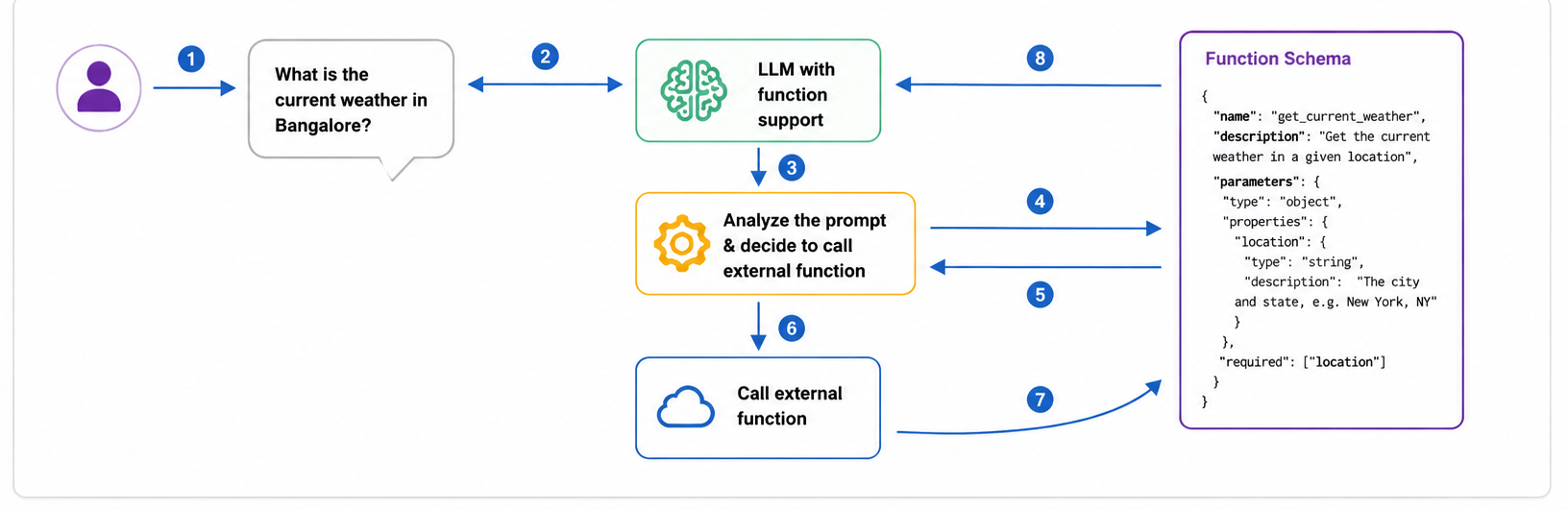
Function calling is the mechanism underneath all of this, and it is worth seeing once before going further. To do something in an external web app, we used to open that app and click through its interface. With function calling, the company that builds the app exposes its API functions instead, and the model calls them on your behalf.
Ask something like "What is the current weather in Bangalore?" and the model does not answer from memory. It reads the descriptions of the functions available to it, decides that one of them fits the request, and fills in the arguments that function expects, which in this case is the location. The function runs, the result comes back, and the model turns that raw output into a readable answer.
You wrote one line of English. Choosing the function, converting your words into the format it expects, calling it, and reading the reply all happened out of sight.
The Two Problems MCP Solves
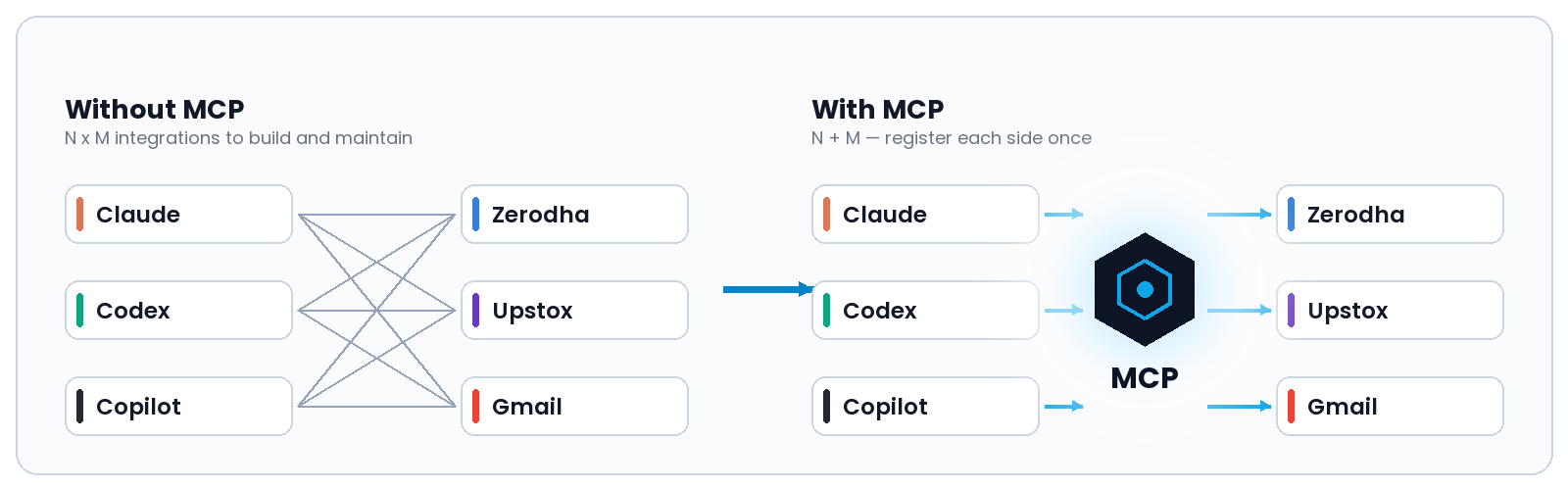
Today, each web service is reached through its own API, with its own shape and its own rules. To use Gmail from a program, for instance, we call the Gmail API directly, and doing the same for a second service means learning a second API. With an MCP server, the model calls the relevant API for us, and the work of learning each one moves to the server.
The second problem is configuration. Each service has to be wired up separately for each model, so N models and M services mean N × M combinations to build and maintain. MCP cuts that to N + M, because each model and each service only has to be registered once. This is why a broker that publishes one MCP server is instantly usable from every client that speaks the protocol, without doing anything specific for any of them.
The Parts of MCP
| Part | What it is |
|---|---|
| MCP Hosts | Programs such as Claude Desktop, IDEs, or AI tools that want to reach data through MCP |
| MCP Clients | Protocol clients that hold a 1:1 connection with a server |
| MCP Servers | Lightweight programs that each expose a specific set of capabilities through the standardized protocol |
| Local Data Sources | The files, databases, and services on your own computer that MCP servers can securely access |
| Remote Services | External systems reachable over the internet, through APIs, that MCP servers can connect to |
AI Tools That Support MCP
MCP is not tied to one assistant. The same server works across clients, so a broker only has to publish it once.
| AI tool | How MCP is added |
|---|---|
| Claude (web, Desktop, Claude Code) | Custom connector, or the desktop config file |
| OpenAI Codex (CLI and IDE extension) | ~/.codex/config.toml, over stdio or streamable HTTP |
| GitHub Copilot (VS Code Agent mode, Copilot CLI) | Local and remote MCP servers |
| Cursor | Local and remote MCP servers |
Functions Zerodha Exposes Through Kite MCP
Zerodha's Kite MCP server exposes the following tools.
| Group | Function | What it returns or does |
|---|---|---|
| Authentication | login | Logs in to the Kite API and generates the authorization link |
| Market data | get_quotes | Real-time market quotes |
| Market data | get_ltp | Last traded price |
| Market data | get_ohlc | Open, high, low, and close data |
| Market data | get_historical_data | Historical price data |
| Market data | search_instruments | Searches trading instruments |
| Portfolio | get_profile | User profile information |
| Portfolio | get_margins | Account margins |
| Portfolio | get_holdings | Portfolio holdings |
| Portfolio | get_positions | Current positions |
| Portfolio | get_mf_holdings | Mutual fund holdings |
| Orders | get_orders | Lists all orders |
| Orders | get_trades | Trading history |
| Orders | get_order_history | Order execution history |
| Orders | get_order_trades | Trades for a specific order |
| Orders | place_order | Places a new order |
| Orders | modify_order | Modifies an existing order |
| Orders | cancel_order | Cancels an order |
| GTT | get_gtts | Lists Good Till Triggered orders |
| GTT | place_gtt_order | Creates a GTT order |
| GTT | modify_gtt_order | Modifies a GTT order |
| GTT | delete_gtt_order | Deletes a GTT order |
On Zerodha's hosted endpoint every operation is read-only, and order placement is unavailable except for GTT orders. The order tools above ship in the open-source server, so they apply only if you host it yourself.
How to Connect Kite MCP
The hosted server URL is https://mcp.kite.trade/mcp, and no API key is required.
Method 1, a custom connector. In Claude, open Settings → Connectors → Add custom connector, paste the server URL, save, and complete the Kite login when you are prompted to authorize it.
Method 2, the config file. Install Node.js, then open Settings → Developer → Edit Config in Claude Desktop and add:
{
  "mcpServers": {
    "kite": {
      "command": "npx",
      "args": ["mcp-remote", "https://mcp.kite.trade/mcp"]
    }
  }
}
Save the file and restart the app. A tools icon appears in the chat once the server connects. Run the login tool and finish authorizing in your browser. Codex and Copilot take the same server URL in their own configuration files.
Your Zerodha credentials never pass through the AI tool. You log in on Kite's own pages using its two-factor flow, the assistant receives only a temporary token, and you can revoke access at any time.
Prompts You Can Use
| Prompt | Function it calls |
|---|---|
| "Show me my current holdings with profit and loss." | get_holdings |
| "What is my total portfolio value today?" | get_holdings |
| "List my open positions and their unrealized P&L." | get_positions |
| "How much margin do I have available?" | get_margins |
| "What is the last traded price of Reliance and Infosys?" | get_ltp |
| "Give me the daily OHLC for HDFC Bank for the last month." | get_ohlc, get_historical_data |
| "Find the trading symbol for Tata Motors on NSE." | search_instruments |
| "Show all the orders I placed today and their status." | get_orders |
| "List my mutual fund holdings." | get_mf_holdings |
| "Which of my holdings are down more than 10 percent?" | get_holdings |
| "What are my active GTT orders?" | get_gtts |
| "Compare the sector concentration in my portfolio." | get_holdings, get_quotes |
Brokers That Support MCP
| Broker | Official MCP? | Access | Authentication |
|---|---|---|---|
| Zerodha (Kite MCP) | Yes, hosted and open-source | Read-only, except GTT orders | Kite OAuth2 with two-factor login |
| Upstox | Yes, announced February 25, 2026 | Read-only, no trade execution | OAuth, with daily reauthorization |
| Angel One | No, community servers only | Varies by project | You supply your own API key and time-based one-time password (TOTP) |
| Dhan | No, community servers only | Varies by project | You supply an access token and client ID |
| Groww | No, community servers only | Varies by project | You supply a JWT access token |
Only Zerodha and Upstox run MCP servers themselves. For the rest, the servers are third-party projects that ask for your broker API credentials, so check who wrote the code before connecting one to a live trading account.
Conclusion
MCP is a very useful protocol. It lets us connect all kinds of tools to a model, so we no longer need to open a broker's interface every time we want to run a particular function, and one published server works in Claude, Codex, and Copilot alike.
Be clear about what it is good for today. Both official Indian servers, from Zerodha and Upstox, are read-only: they will tell you what you hold and what it is worth, but they will not place a trade. And only two brokers run a server themselves, so before connecting anything, ask who wrote the code sitting in between.
References
- Model Context Protocol, official documentation
- Anthropic, Introducing the Model Context Protocol
- Zerodha, Kite MCP product page
- Zerodha Z-Connect, Connect your Zerodha account to AI assistants with Kite MCP
- Zerodha, kite-mcp-server source and tool list on GitHub
- Upstox Community, Announcing Upstox MCP
- Anthropic Help Center, Get started with custom connectors using remote MCP
- GitHub Docs, About Model Context Protocol in Copilot
- Model Context Protocol, Connect to remote MCP servers
- #MCP
- #Model Context Protocol
- #MCP Server
- #Kite MCP
- #Zerodha
- #Upstox
- #Claude
- #OpenAI Codex
- #GitHub Copilot
- #Cursor
- #Anthropic
- #AI Agents
- #LLM Function Calling
- #Large Language Models
- #AI in Finance
- #AI Trading Tools
- #Broker API
- #Portfolio Tracking
Related articles

AI & Finance9 min read

AI & Finance8 min read

Investing14 min read
Stay ahead on finance & AI
Weekly articles on personal finance, investing strategies, and how AI is changing the way we manage money. Free. No spam.
Join free · Unsubscribe anytime · We never share your email.